Redesigning Card Reconciliation for Nutrition International
UI/UX design to replace a multi-application reconciliation workflow with a single, central platform aimed at reducing delays and errors.
- CLIENT
- Nutrition International
- STUDIO
- Techminte Technologies
- PERIOD
- Q1 2024
- ROLE
- Sole UI/UX Designer
The Problem: A reconciliation process held together with spreadsheets
Nutrition International is a global non-profit focused on nutrition interventions across developing regions. Their finance team manages hundreds of card-based transactions every month, including travel expenses, purchases, and field spending, all of which require a formal reconciliation before a statement can be approved.
This reconciliation process happened across multiple tools where members take a list of transactions assigned to them and populate the data into a spreadsheet before sending for approval through emails. Each handoff between tools introduced delays. Approvers frequently received incomplete submissions, and the involved parties had no centralized view of where a statement stood at any point in time.
What was needed was straightforward: build a single application where every step of the reconciliation process lives, from the upload of a bank statement to the final approval. No more switching tools. No more multiple tabs.
Key constraints
- The organization had an existing design standard. The UI needed to conform to its style guide and component patterns where possible.
- The approval chain was rigid. No approval could be skipped and the next process had to wait for its completion.
- Company regulatory requirements meant every action needed to be logged.
Discovery: Understanding the what, how and who
Before any design work started, I ran a discovery phase alongside the project lead at Techminte. We held calls and sessions with staff members, observed a live reconciliation cycle to understand the actual workflow, then used our observations to put down a PRD detailing what we needed to do.
During this phase we found that a major frustration staff members were experiencing was having to deal with multiple tools and going over the same process multiple times during reviews for a single batch of transactions.
Key research findings
- A lot of tools were involved in the reconciliation process. A typical flow involved a statement being assigned via email, reconciled in a spreadsheet, then shared to the first approval level for review and remarks. When it passed that stage, the approver digitally signed to notify the next level.
- Statements took a relatively long time to close, from the initial document sharing down to final approval.
- No one had any real-time view of a statement's status, so they could not track what was causing delays.
Defining the Direction: Three distinct users, one connected workflow
The most important structural decision in this project was recognizing early that this was a single product meant to serve different connected user types. They all had access to the same data, but how they interacted with it and the actions they could perform were different. Simply designing for a generic user would have resulted in a tool that worked adequately for nobody.
We defined three major user types and mapped their specific needs before drawing a single screen:
Finance Initiator
Uploads bank statements, assigns people to them, and monitors the overall statement progress.
Staff Initiator
Populates transaction rows with amounts, receipts, and notes. Needs to be able to easily perform edits.
Approvers
Review and approve or query submitted data. Needs to be able to view transactions to know exactly what they're approving.
Administrators were a fourth group with a narrower scope. Their actions were limited to viewing completed statements, setting escalation timelines, and assigning roles. They only needed a dashboard view, not a workflow view.
Design principles we established
- Context travels with the data. Every transaction should carry its full history: the people involved, the status, and so on.
- Role defines what you see. Each user type sees only the actions available to them.
- The table is the product. For initiators, the transaction table is where the work lives. Everything else supports it, not the other way around.
Explorations & Iterations: Viewing and editing transactions in a single view
While the rest of the application felt straightforward, we had to explore ways to handle how transactions were edited. A typical statement contained multiple transactions edited one by one. We went through two rejected approaches before arriving at a final solution.
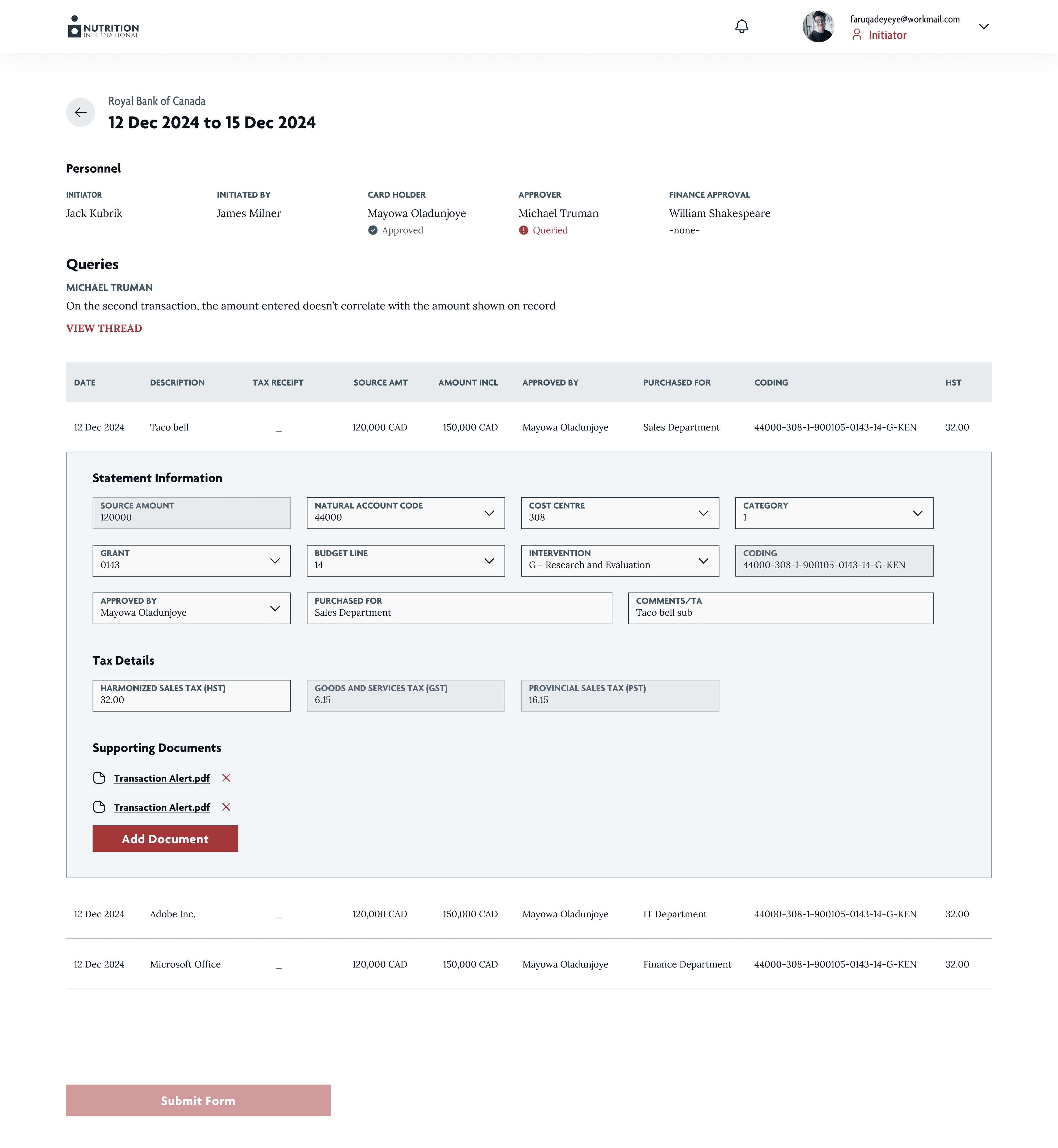
The final solution was a scrollable inline table. Each transaction row now expands inline on click, revealing editable fields within the row itself. The rest of the table remains visible and scrollable while editing, and all edits are preserved even if the row is closed.
This solution emerged directly from a user test observation: opening a modal or navigating to a new page required multiple clicks, and users lost the ability to view the rest of the transactions. We wanted the table to feel as close as possible to working in Excel.
Final Designs: A unified reconciliation platform
The final product is a single web application with role-based views. When a user logs in, the interface adapts to their assigned role and presents only the actions they can take and the statements relevant to them. The reconciliation chain flows in one direction: document upload → data entry → card holder approval → staff approval → finance approval → close/finalize.
Finance Initiator
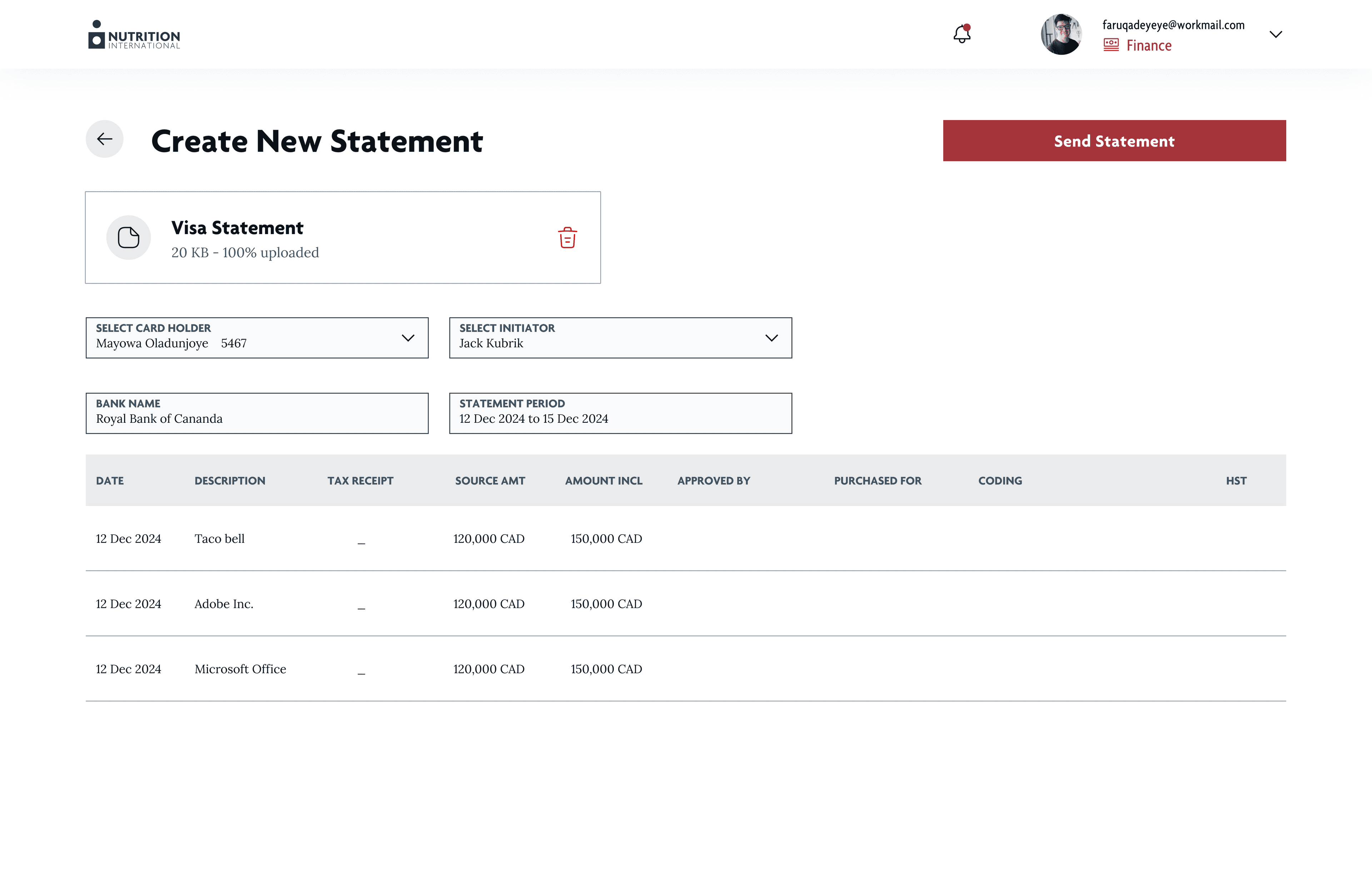
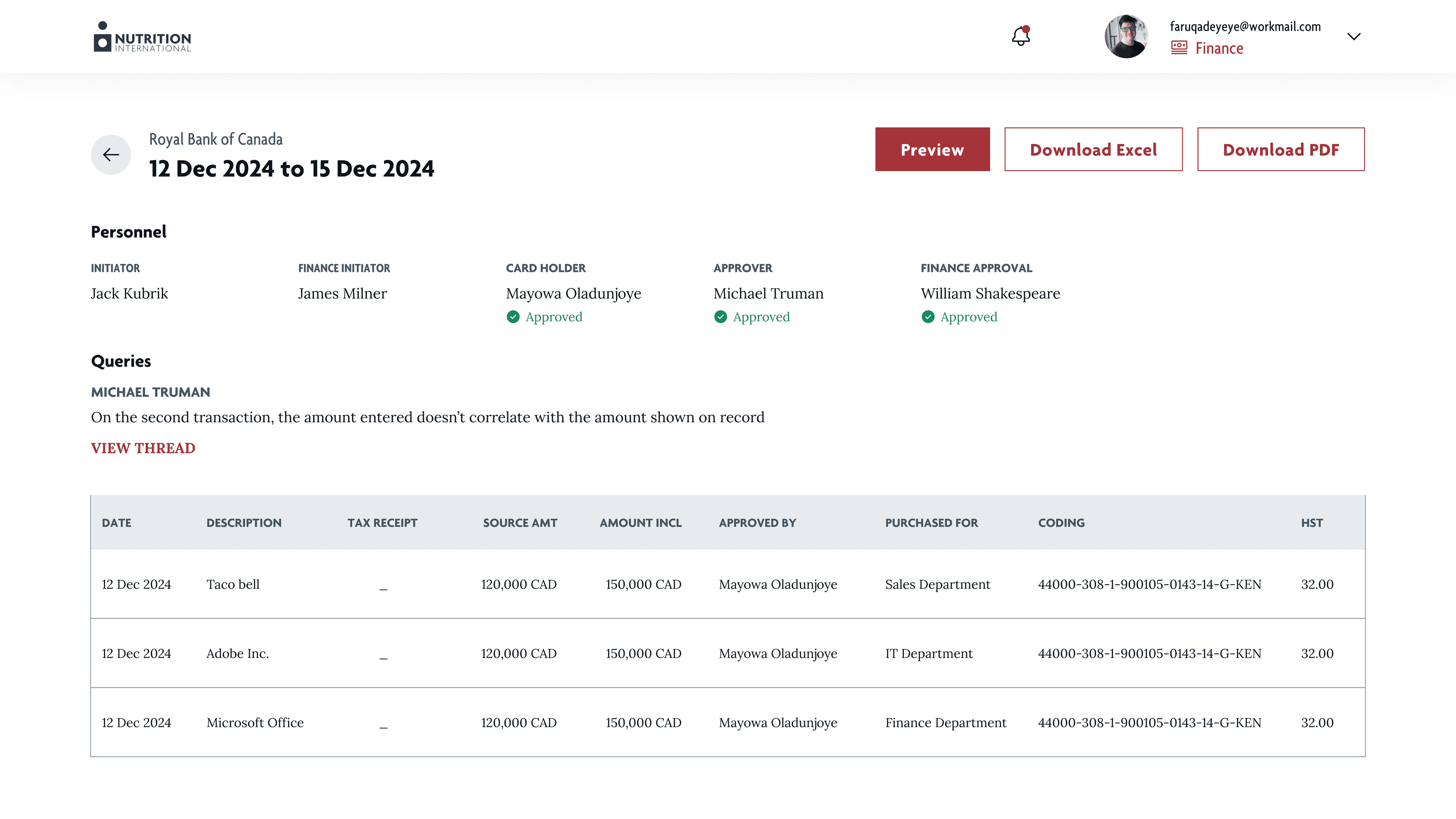
The finance initiator is able to view all active statements with status indicators showing where each one is in the reconciliation process. They can also upload a new bank statement document, which auto-populates certain fields on the table.
Staff Initiator
They handle the core part of the work. Staff initiators can see all statements assigned to them and start the reconciliation process. Each statement contains a number of transactions they can review and edit as necessary.
Approver
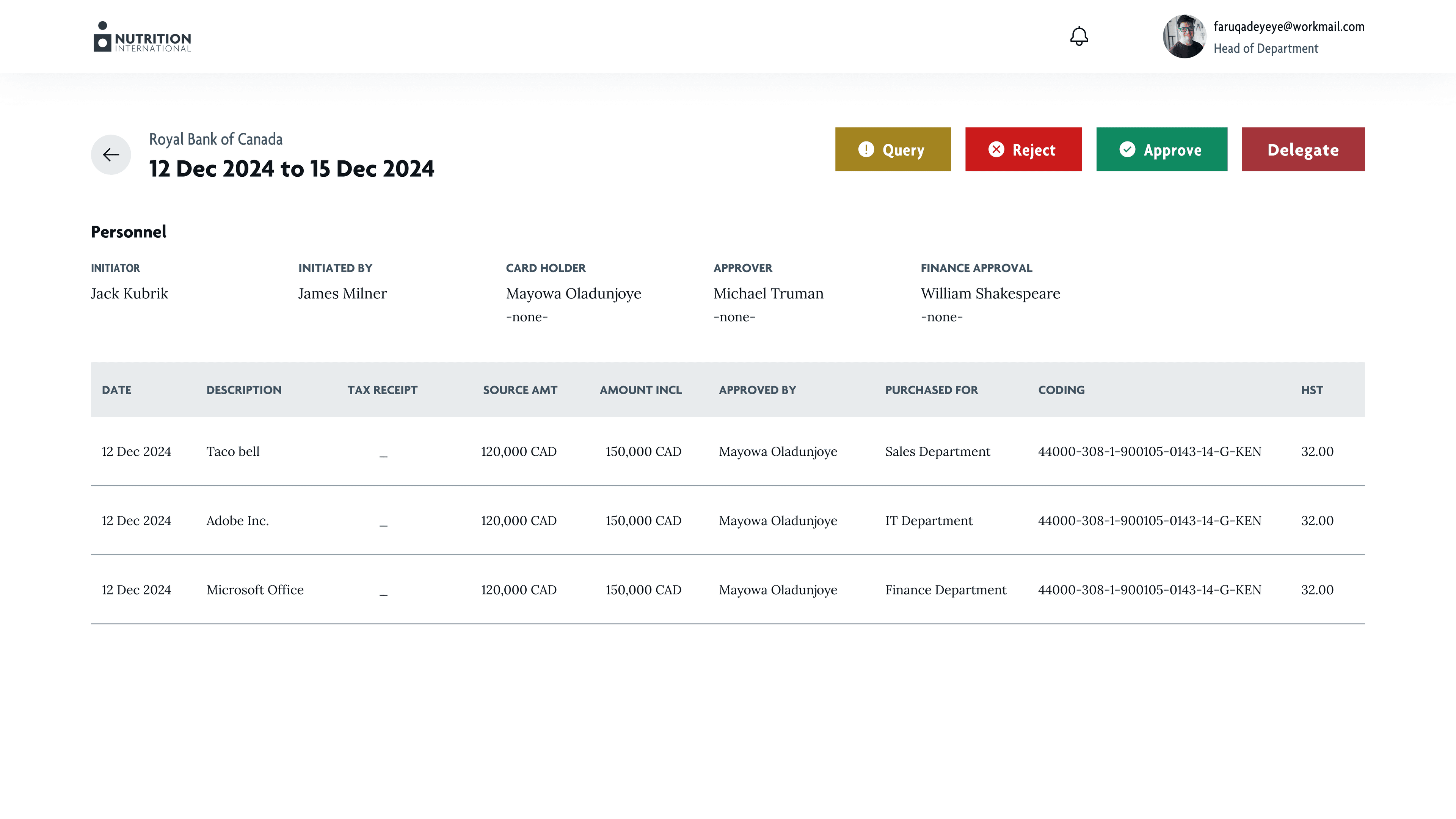
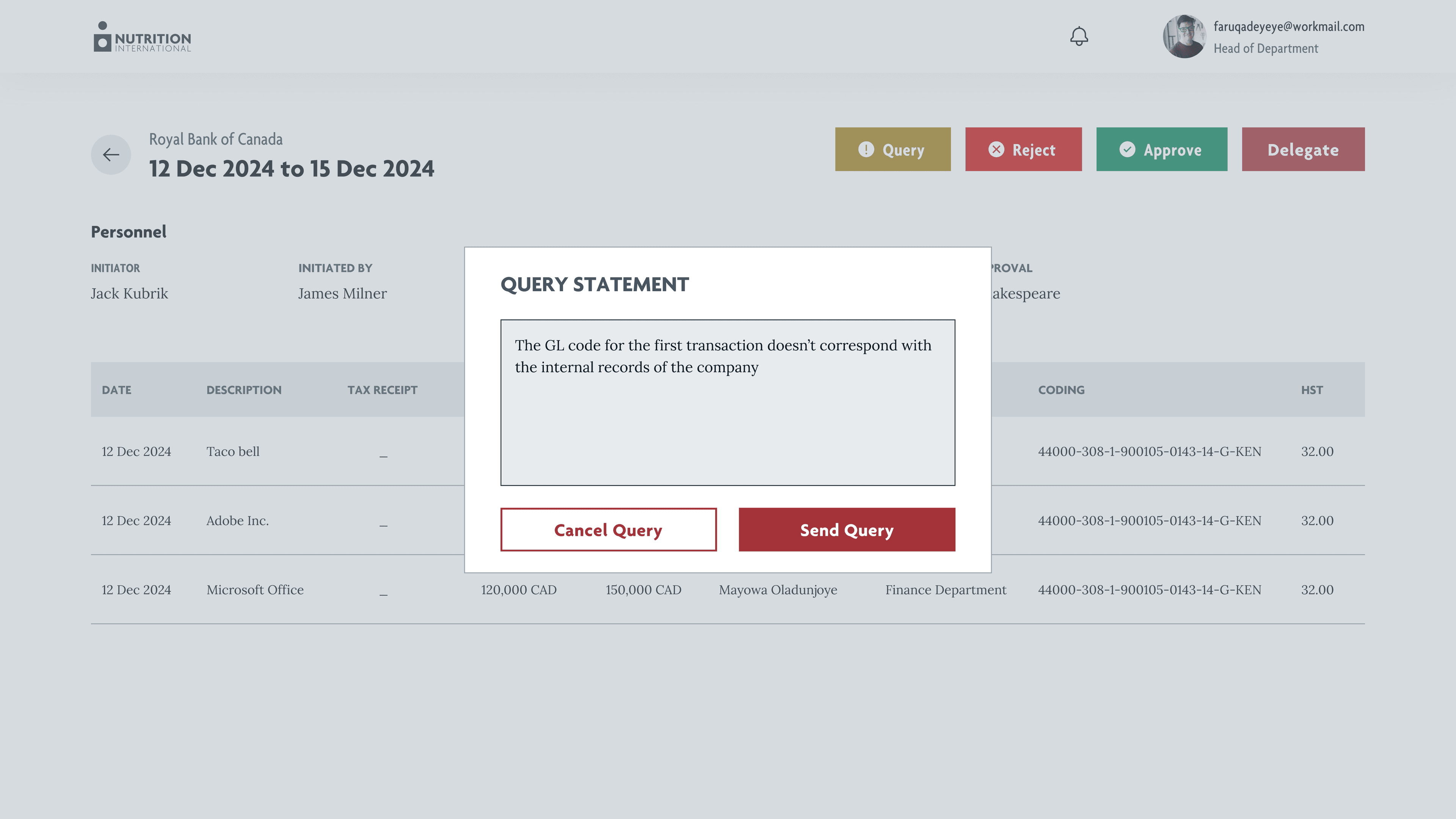
Approvers see the completed table in a similar view to the Staff Initiator but lack the ability to make edits. They can easily spot mistakes and raise queries. If satisfied, they approve the statement. It will not move to the Finance Approver until approved by the Staff Approver, and will not move to the Staff Approver until approved by the Card Holder, making mistakes hard to miss.
Administrator
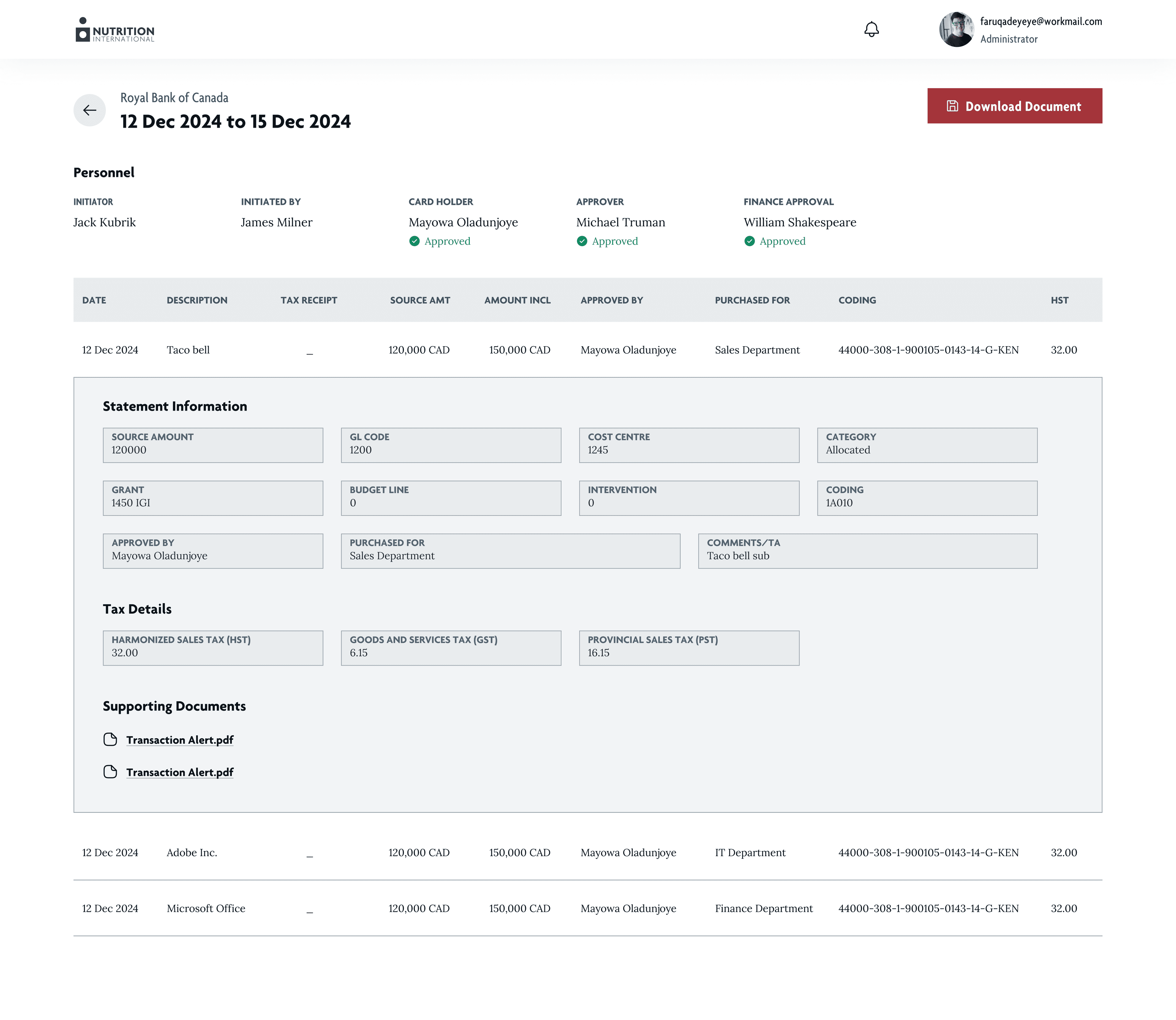
The administrator cannot edit or approve statements. They can only view statements, export closed statements, set escalation rules, and manage user roles.
Results: Faster closures and fewer errors
After launching the product with the Nutrition International team, we received positive feedback on how the application had elevated and sped up their workflow. The feedback mainly covered three areas: how quickly they now closed statements, the reduced need for emails throughout the approval process, and the delegation feature, which helped them reassign statements they couldn't handle at the moment to someone else.